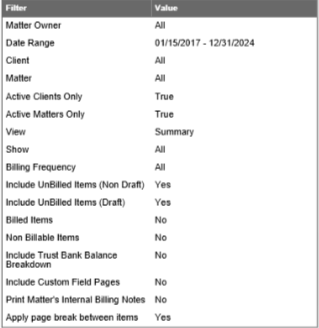
View reports for only active matter owners, see the filter summary in each report.
Enhancements
Exclude Inactive Matter Owners

When generating reports, if users wish to exclude inactive matter owners from the list of matter owners in the drop-down, they can now check the Active Matter Owners only box for the following reports:
- Accounts Receivable
- Invoice Journal
- Invoice Change/Write-offs – Journal
- Invoice Payment Allocations
- Pre-Bill (Matter Billing Report)
- Matter Billing Log
- WIP Summary
- Balance By Matter Name
- Billing Balance By Matter Name
- Matter Billing Rate
- Split Billing Report
- Split Billing Verification List
- Fixed Fee Billing Reconciliation
- Matter with Receivable & Retainer Balance
- Billing By Matter Owner
- Billed Fee Allocation
- Collection By Matter Owner
- Collected Fee Allocation
- Financial Productivity Report
- Fee Recovery Report
- Top Clients
- Client List
- Matter Transactions
- Client-Matter Ledger
- Trust Ledger Balance
- Trust Ledger Activity Summary
- Trust Ledger Transactions
- Client’s Trust Ledger
- Trust Balance By Matter Name
Filter Summary in Report
Each report that a user generates will include a summary of the applied filters at the bottom of the report to give users the criteria for data that appears on the report.